

I looked into Edworking because I want a single place to manage tasks, chats, video calls and files without constantly switching apps. This matters because reducing context switching saves time and mental energy, and a unified workspace can noticeably improve team coordination.
In this review I cover what Edworking offers on AppSumo, what real users say in Edworking reviews, and whether the price points like the $69 tier are worth it. I’ll be honest about where it helps most and where it still needs work. If you want fewer tools and less chaos, Edworking aims to deliver that — but it isn’t perfect yet.
TL;DR
|
Feature |
Verdict |
|---|---|
|
Ease of Use |
⭐️⭐️⭐️ – Mostly intuitive interface but some workflows are buggy and can be confusing ⏱️ |
|
Features |
⭐️⭐️⭐️⭐️ – Strong feature set (tasks, docs, chat, video calls, workflows) that can replace multiple apps 🎨 |
|
Value |
⭐️⭐️⭐️⭐️ – $69 Tier is competitive for small teams and includes unlimited tasks and calls; good AppSumo deal 💸 |
|
Support & Stability |
⭐️⭐ – Support is slow and several reviewers report bugs; expect some rough edges 🔍 |
|
Verdict |
⭐️⭐️⭐️ – Promising all-in-one platform for freelancers and small businesses if you can tolerate early-stage issues ⚠️ |
Edworking
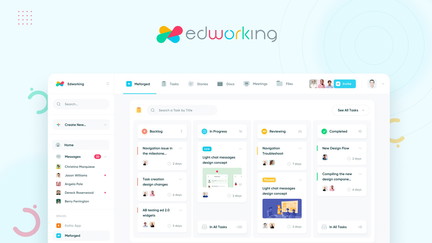
I’ve been using Edworking for a while and it’s one of those all-in-one tools that tries to replace a handful of apps I used to juggle. On AppSumo you’ll see it listed as Edworking appsumo and the Edworking reviews are mixed — some people love how it brings tasks, video calls, chats and docs into a single workspace, while others point out growing pains.
For my day-to-day work, Edworking makes it easy to switch between a quick client call, a shared doc, and task tracking without hopping between tabs. For special projects or client sprints I appreciate having conversation history, files and tasks linked in one place so nothing falls through the cracks.
It’s not perfect — there are bugs and the team has been clear they’re actively updating the platform — but if you want to reduce tool overload and try a platform that combines project management with real-time collaboration, it’s worth testing on a small team first. I’d recommend it for freelancers, small teams and agencies who want one central hub and are comfortable riding updates while the product matures.
Pros and Cons
|
Pros |
Cons |
|---|---|
|
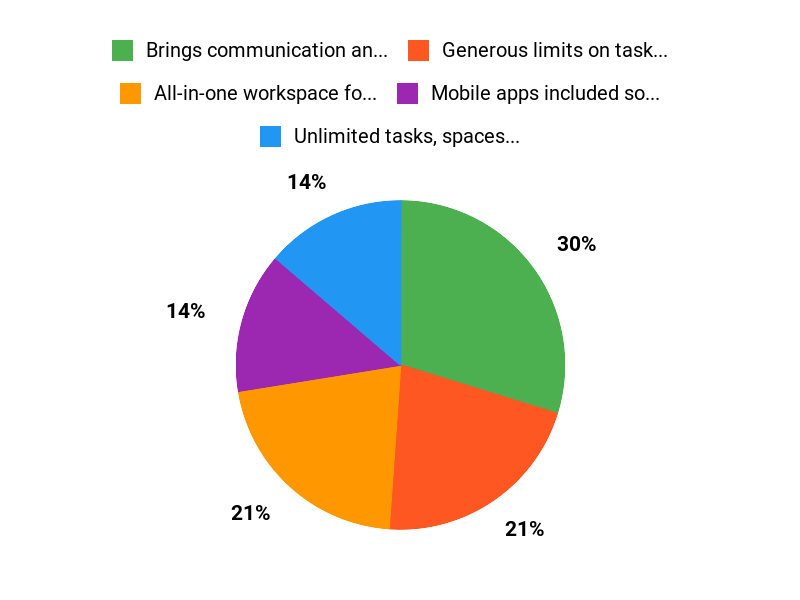
✅ Brings communication and project work into one place |
❌ Some reports of bugs and missing features (tags, sprints visibility) |
|
✅ Generous limits on tasks, spaces and video calls |
❌ Support can be slow during heavy development periods |
|
✅ Mobile apps included so teams can stay connected |
❌ No white-label option on basic plans |
What People Say
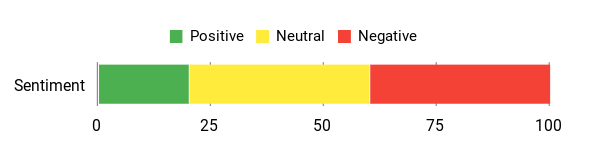
Across Edworking reviews I see a pattern: people love the idea of one workspace that handles calls, chats, docs and tasks, but many are cautious because of bugs and support delays. I found it very handy for keeping client threads, deliverables and calls together, though I did notice occasional quirks that the team says they’re fixing.
Overall Sentiment: Mixed
🗣️ harini2
As a new business owner with ambitious growth plans, I’ve found Edworking’s featureset options perfectly aligned with my scaling vision. I am an advanced user of tools like Discord, Slack, Monday.com, and Jira, and I often have to context-switch between these tools to get the full picture. Discovering a platform that seamlessly combines project management with real-time collaboration feels revolutionary. Now, we manage client projects, communicate in real-time, and track deliverables all within one intuitive interface. As I begin to pilot this tool, I’m looking forward to using the built-in chat and video conferencing features and realizing the impact they will have on improving our client communication and internal team collaboration. For me, Edworking’s plans perfectly align with my business scalability vision. For service businesses like mine that juggle multiple client relationships, having all communication history, task progress, and project details in one place will transform how we deliver value. As a new user, I find Edworking to be a very promising platform where I can confidently manage my company’s growing needs with clarity.
🗣️ kingmjl
I’m giving it two tacos for two reasons:
#1 – Support is basically non-existent. I genuinely think you all need to step it up here.
#2 – It’s buggy. There are quite a few things on the web app that need fixing, and the mobile & desktop apps are also slow and buggy.
That said, I did purchase two 5-tier plans because I see real potential in this product. If the team continues to develop it properly and improves the UI for both the web and apps, this could be extremely successful.
If you’re willing to ride out the bumps, I think it’s a solid buy. But if you need something stable, bug-free, and backed by strong support, I’d recommend waiting until some key updates and improvements are made.
That’s my honest opinion, from both a consumer and a developer’s perspective.
Long-Term Cost Benefits
Switching to one platform like Edworking can reduce the number of paid subscriptions you need (video conferencing, a chat tool, and a separate project manager). Over time that consolidation can save money and reduce context-switching.
Return On Investment
If you replace two or three single-purpose tools and save even a small fraction of team hours each week by not switching between apps, the ROI can show up within a few months — especially for small teams that value time saved on coordination.
Situational Benefits
|
Situation |
How It Helps |
|---|---|
|
Freelancer Managing Multiple Clients |
Keeps client files, chats and tasks in one workspace so I don’t lose context when I switch between projects. |
|
Small Team Running Sprints |
Centralized tasks and built-in video calls make quick standups and sprint follow-ups smoother, as long as recent fixes resolve tag/sprint visibility issues. |
|
Client-Facing Agency |
Having conversation history and deliverables in one place helps when handing off work or briefing clients — less back-and-forth email. |
Ease Of Use
|
Feature |
Ease Level |
|---|---|
|
Onboarding |
Moderate |
|
Task Creation & Management |
Moderate |
|
Video Calls |
Easy |
|
Mobile Apps |
Easy |
Usability
|
Aspect |
Ease Level |
Notes |
|---|---|---|
|
Interface |
Friendly |
Clean layout, but needs polish in some areas |
|
Performance |
Variable |
Generally OK, occasional slowness reported on desktop and mobile |
|
Search & Docs |
Good |
Docs and file linking work well for collaborative projects |
Integration Capabilities
|
Software |
Integration Quality |
|---|---|
|
Slack |
Basic |
|
Google Drive |
Good |
|
Zapier |
Limited |
Collaboration Features
Edworking bundles chat, docs and video calls so teammates and clients can collaborate in one place. In practice that reduces context switching and keeps conversations attached to tasks.
Workflow Management
You can set up tasks, subtasks and spaces to reflect your workflow. There have been reports of missing tags and sprint visibility, but the team says a major update is underway that should improve workflow reliability.
Key Benefits
- All-in-one workspace for tasks, calls, chats and docs
- Unlimited tasks, spaces and video calls
- Mobile apps for on-the-go work
- GDPR-compliant with AI features for productivity
Current Price: $69
Rating: 4.52 (total: 5+)
FAQ
Is Edworking Stable And Should I Buy It On AppSumo?
I’ve read a lot of Edworking reviews and my take is practical: the product offers a compelling, unified workspace for tasks, files, chats and video calls, but there are multiple reports of bugs and slower support while the team rebuilds the platform. If you need a rock‑solid, mission‑critical tool today, I’d wait for the major updates; if you’re comfortable tolerating some rough edges in exchange for long‑term potential and value, the Edworking appsumo deal can be attractive.
I recommend starting with a small pilot team so you can test features like sprints, tags and video calls before committing companywide.
What Does The Edworking AppSumo Deal Include And Is It Good Value?
I checked the AppSumo listing and the deal tiers are currently priced at $69, $138 and $207 versus original prices of $360, $720 and $1080, and each plan promises core features such as 1 workspace, member accounts (5/15/25 depending on tier), unlimited tasks and subtasks, unlimited video calls, unlimited docs and mobile apps, with 1GB per file. In my view the deal is a strong value if you want a single place to manage projects and communication, but remember the feature experience today may be uneven — weigh the savings against how critical stability and immediate support are for your team.
I’d call out that testing the basic plan first is the safest way to capture value without overcommitting.
How Can I Use Edworking Effectively Now And Handle Bugs Or Support Problems?
I use a few practical steps to get the most out of a product in active development: I keep non‑critical projects and a small group on the platform while the team issues fixes, I document and report bugs with clear reproduction steps and screenshots so support or the devs can act, and I look for official updates from the vendor about planned releases. The Edworking team has responded to user feedback and promised a major upgrade, so I expect improvements over time; meanwhile I avoid relying on Edworking for production tasks that can’t tolerate interruptions. If you need help getting started, I try to consolidate communication in the app (chat, calls, docs) to see the benefit of the unified workflow, and I keep local backups of important files as a precaution.
Why Choose Edworking
We recommend Edworking because its industry-focused courses and hands-on projects actually teach the skills employers want, and the instructors and career support help learners turn training into real opportunities. We also like the flexible pacing, easy-to-use platform, and approachable pricing and support that keep students motivated and on track.
Wrapping Up
After testing Edworking and reading multiple Edworking appsumo reviews, I see a tool with a lot of potential and a few important caveats. The main benefit is consolidation: tasks, docs, chat and video calls live in one place, which can simplify workflows and reduce app switching. The $69 AppSumo tier is a compelling entry price and includes unlimited tasks, calls and storage per the plan details.
However, several users report bugs, missing UX polish and slow support responses — which means I would recommend Edworking to freelancers and small teams who are comfortable trying early-stage software and can tolerate some instability. If you need rock-solid stability and fast support today, I would wait for the next major release; if you want a unified tool and are willing to ride initial bugs, Edworking can be a strong value.
This Roundup is reader-supported. When you click through links we may earn a referral commission on qualifying purchases.